
Key facts
- Brand
- METTLER-TOLEDO
- Model
- FE28
- Industry
- Health
- Documents
- 2
- Languages
- ZH · EN
- Last added
- 2026-10-24
Start here
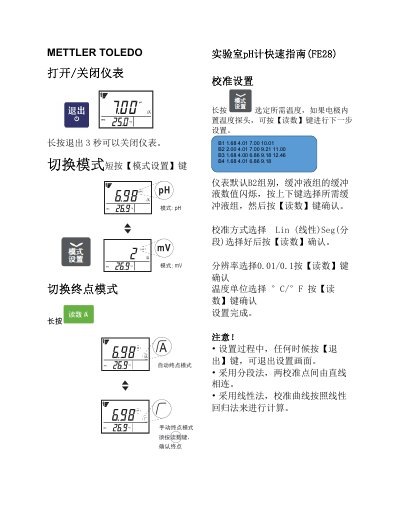
METTLER TOLEDO FE28 Laboratory pH Meter Quick Start Guide
The document provides a brief overview of operating the METTLER TOLEDO FE28 instrument. It explains how to turn the device off by holding the Exit key for three seconds and how to switch between modes using the Mode/Settings button.
Detailed instructions are provided for calibration, including selecting buffer groups (B1-B4) and choosing between linear or segmented calculation methods. The guide also covers measurement steps and specifies that electrodes should be stored in appropriate storage solutions rather than deionized water. This manual is written in Chinese.
All Mettler Toledo FE28 documents by type
The shortest path to a working setup, usually only a few pages.
Day-to-day operation, settings and troubleshooting. Start here if the product is already set up.
Questions answered in these manuals
How do you turn the FE28 meter off?
To turn off the instrument, press and hold the Exit key for 3 seconds.
From: METTLER TOLEDO FE28 Laboratory pH Meter Quick Start Guide
What are the default buffer groups for calibration?
The instrument defaults to Group B2, which includes buffers at 2.00, 4.01, 7.00, 9.21, and 11.00.
From: METTLER TOLEDO FE28 Laboratory pH Meter Quick Start Guide
What is the stated measurement range of this pH meter?
The device measures a pH range from 0 to 14.
From: Mettler Toledo FiveEasy Plus FE28 pH Meter User Manual
What are the operating temperature limits for this instrument?
The unit operates within a temperature range of 0 °C to 40 °C.
From: Mettler Toledo FiveEasy Plus FE28 pH Meter User Manual