
Key facts
- Brand
- InBody
- Model
- 270
- Category
- Health Care
- Industry
- Health
- Documents
- 2
- Languages
- EN
- Last added
- 2026-11-15
Start here
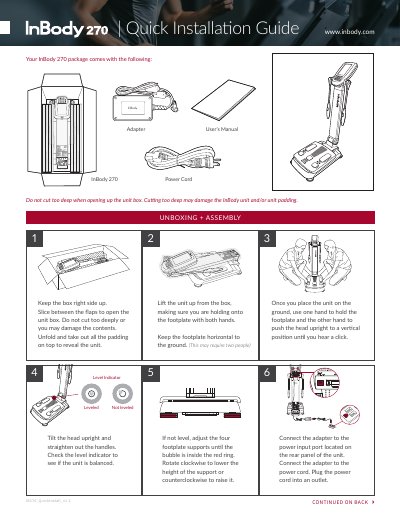
InBody 270 Body Composition Analyzer Quick Start Guide
The InBody 270 body composition analyzer is unpacked by keeping the box right side up and slicing between the flaps without cutting too deeply. After removing the padding, place the unit on the ground, hold the footplate, and push the head upright until it clicks. Lift the unit by the footplate with both hands, keeping it horizontal, then tilt the head upright and straighten the handles. Check the level indicator and adjust the four footplate supports until the bubble is inside the red ring.
Connect the power adapter to the rear panel and plug the cord into an outlet. Turn on the unit with nothing on the footplate, then open the Administrator Menu with the default password "0000" to set a new four-digit passcode. The guide also covers updating the logo from a USB drive, connecting a printer, and setting the date and time in 24-hour format.
InBody 270 specifications
| Default administrator password | 0000 |
|---|---|
| Passcode length | four-digit |
| Time display format | 24-hour |
Source: InBody 270 Body Composition Analyzer Quick Start Guide
All InBody 270 documents by type
The shortest path to a working setup, usually only a few pages.
Day-to-day operation, settings and troubleshooting. Start here if the product is already set up.
Questions answered in these manuals
What is the default password for the Administrator Menu?
The default password is "0000"; you may keep using it if you do not want a new password.
From: InBody 270 Body Composition Analyzer Quick Start Guide
How is the InBody 270 leveled after assembly?
Check the level indicator and adjust the four footplate supports until the bubble is inside the red ring.
From: InBody 270 Body Composition Analyzer Quick Start Guide
How does the device assist with user posture?
It offers step-by-step voice guidance to ensure correct posture during measurement.
What is the InBody 270?
The InBody 270 is a body composition analyzer designed for efficient workflow and reliable performance.