
InBody 270 body composition analyzer quick start guide: unboxing, assembly, power, passcode, logo, printer, and date/time setup.
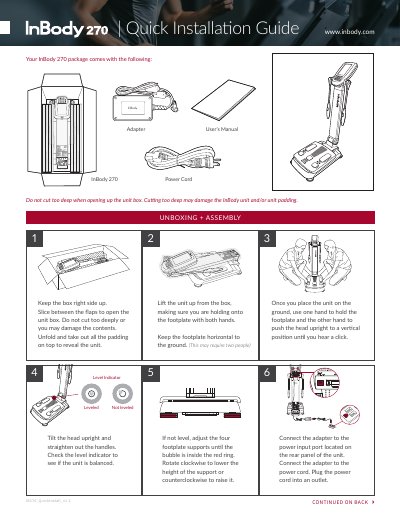
The InBody 270 body composition analyzer is unpacked by keeping the box right side up and slicing between the flaps without cutting too deeply. After removing the padding, place the unit on the ground, hold the footplate, and push the head upright until it clicks. Lift the unit by the footplate with both hands, keeping it horizontal, then tilt the head upright and straighten the handles. Check the level indicator and adjust the four footplate supports until the bubble is inside the red ring.
Connect the power adapter to the rear panel and plug the cord into an outlet. Turn on the unit with nothing on the footplate, then open the Administrator Menu with the default password "0000" to set a new four-digit passcode. The guide also covers updating the logo from a USB drive, connecting a printer, and setting the date and time in 24-hour format.
| Default administrator password | 0000 |
|---|---|
| Passcode length | four-digit |
| Time display format | 24-hour |
The default password is "0000"; you may keep using it if you do not want a new password.
Check the level indicator and adjust the four footplate supports until the bubble is inside the red ring.
Time is displayed in 24-hour format but appears on the result sheet as a standard 12-hour format.
Contact the support department at [email protected] with an image file and the InBody model type.