
Key facts
- Brand
- Adobe
- Model
- Dreamweaver CS6
- Category
- Other software
- Documents
- 3
- Languages
- ZH · EN
- Last added
- 2026-10-03
Start here
Adobe Fireworks and Dreamweaver CS6 Interactive Navigation Guide
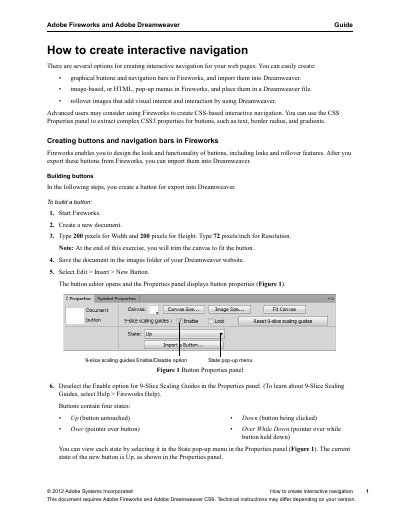
This document provides technical instructions for creating interactive navigation for web pages using Adobe Fireworks and Adobe Dreamweaver CS6. It covers the creation of graphical buttons, image-based pop-up menus, and rollover images. The guide details the step-by-step process of building buttons in Fireworks, including setting up states, adding filters, and aligning text. It also explains how to export these interactive elements as HTML and import them into a Dreamweaver document.
Read onlineAll Adobe Dreamweaver CS6 documents by type
Day-to-day operation, settings and troubleshooting. Start here if the product is already set up.
Questions answered in these manuals
What is the ISBN‑13 of the Dreamweaver CS6 manual?
The ISBN‑13 is 9787830020934.
What version of Dreamweaver does this guide require?
This document requires Adobe Dreamweaver CS6, and technical instructions may differ depending on your version.
What can forms be used for?
Forms can be used to interact with or gather information from site visitors, such as feedback, guest book entries, surveys, or merchandise orders.
What software versions are required for this guide?
This document requires Adobe Fireworks and Adobe Dreamweaver CS6.
From: Adobe Fireworks and Dreamweaver CS6 Interactive Navigation Guide
How do you create a button in Fireworks?
You can use the Rectangle or Ellipse tool to draw a shape, add text, and define four states: Up, Over, Down, and Over While Down.
From: Adobe Fireworks and Dreamweaver CS6 Interactive Navigation Guide