
This manual explains how to set up and control various USB cameras with the Z CAM IPMAN Gemini device.
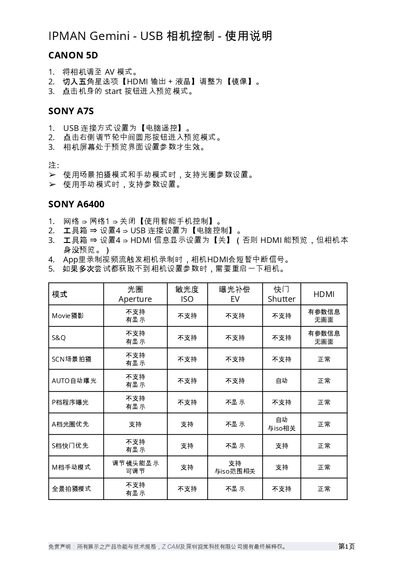
The guide provides step‑by‑step instructions for connecting and controlling a range of supported cameras—including Canon 5D, Sony A7 series, LUMIX S1H/GH5s, Z CAM E2 series and Fujifilm X‑T3—using the IPMAN Gemini's USB interface. It covers required camera settings, USB connection modes, HDMI preview options and special notes for each model.
Additional sections list the supported shooting modes, aperture and ISO options, and include a disclaimer stating that Z CAM and its Shenzhen subsidiary hold final interpretation rights over the product specifications. This manual is written in Chinese.
| USB connection mode (LUMIX S1H / GH5s) | PC (tether) |
|---|---|
| USB connection mode (Z CAM E2 series) | PTP |
Select the USB connection mode "Computer Remote" in the camera’s settings.
Restart the camera and try again.
Aperture can be set in scene shooting mode and manual mode.