
Key facts
- Manuals
- 2
- Languages
- ZH
- Last added
- 2026-09-29
Featured Z-CAM manuals
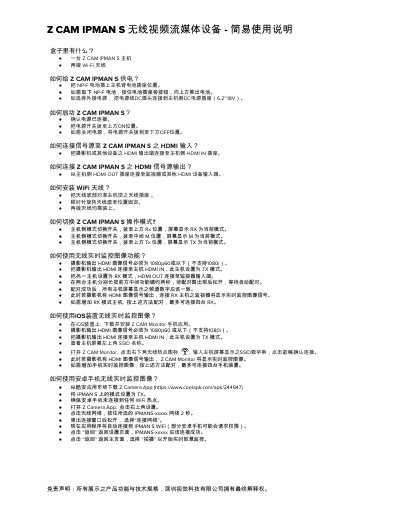
Z CAM IPMAN S Wireless Video Streaming Device Quick Start Guide
The Z CAM IPMAN S is a compact wireless video streaming device that accepts HDMI input from a camera and outputs HDMI to a monitor. This guide provides the essential steps to get the device up and running, including power options, antenna installation, and mode selection.
It covers powering the unit with an NP‑F battery or external DC source, connecting HDMI sources and displays, switching between Rx, M, and Tx modes, and using the Z CAM Monitor app on iOS or Android for real‑time monitoring. Instructions for connecting the device to a Wi‑Fi router and changing Wi‑Fi channels are also included. This manual is written in Chinese.
Covers: Box Contents · Powering the Device · Starting the Device · Connecting HDMI Input · Connecting HDMI Output · Installing Wi‑Fi Antennas
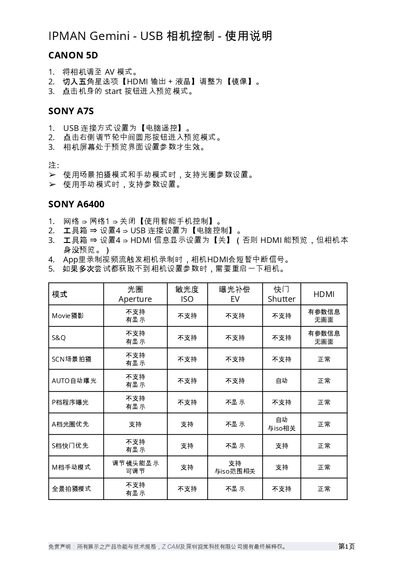
Z CAM IPMAN Gemini USB Camera Control User Manual
The guide provides step‑by‑step instructions for connecting and controlling a range of supported cameras—including Canon 5D, Sony A7 series, LUMIX S1H/GH5s, Z CAM E2 series and Fujifilm X‑T3—using the IPMAN Gemini's USB interface. It covers required camera settings, USB connection modes, HDMI preview options and special notes for each model.
Additional sections list the supported shooting modes, aperture and ISO options, and include a disclaimer stating that Z CAM and its Shenzhen subsidiary hold final interpretation rights over the product specifications. This manual is written in Chinese.
Covers: Canon 5D Setup · Sony A7S Setup · Sony A6400 Setup · Sony A7III Setup · Sony A7C Setup · LUMIX S1H / GH5s Setup
Latest Z-CAM manuals
Z CAM IPMAN S Wireless Video Streaming Device Quick Start Guide
Quick Start Guide 2 pages · 343 KB · ZHA quick start guide that shows how to power, operate, connect HDMI, install antennas, switch modes, and use wireless monitoring with iOS and Android for the…
Z CAM IPMAN Gemini USB Camera Control User Manual
User Manual 3 pages · 142 KB · ZHThis manual explains how to set up and control various USB cameras with the Z CAM IPMAN Gemini device.
Which document do I need?
Quick Start Guide
The shortest path to a working setup, usually only a few pages.
User Manual
Day-to-day operation, settings and troubleshooting. Start here if the product is already set up.
Questions answered in Z-CAM manuals
What USB connection setting is required for a Sony A7S?
Select the USB connection mode "Computer Remote" in the camera’s settings.
What should I do if the camera parameters cannot be retrieved?
Restart the camera and try again.