
This guide explains how to connect the Yealink EHS36 Wireless Headset Adapter to Yealink IP phones and compatible wireless headsets from Sennheiser, Jabra…
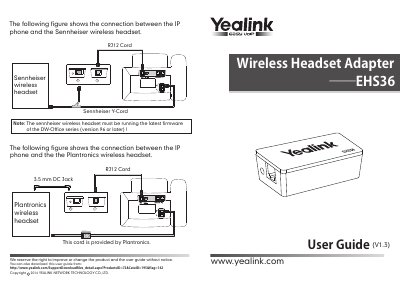
The Yealink EHS36 Wireless Headset Adapter is designed to connect Yealink SIP-T48G/T46G/T42G/T41P/T38G/T28P/T26P IP phones with wireless headsets from Sennheiser, Jabra (GN Netcom), and Plantronics. The adapter facilitates audio connections between the IP phone's headset port and the wireless headset via specific cables.
The EHS36 connects Yealink SIP-T48G/T46G/T42G/T41P/T38G/T28P/T26P IP phones and wireless headsets.
Port 2 connects to the Plantronics wireless headset using the 3.5 mm DC jack.
The Sennheiser wireless headset must be running the latest firmware of the DW-Office series, version 96 or later.
The RJ12 cord connects Port 3 to the IP phone EXT/EHS port.