
The TF-MU USB Card manual explains hardware connections, software setup, program editing, and troubleshooting for the multi‑region LED display controller.
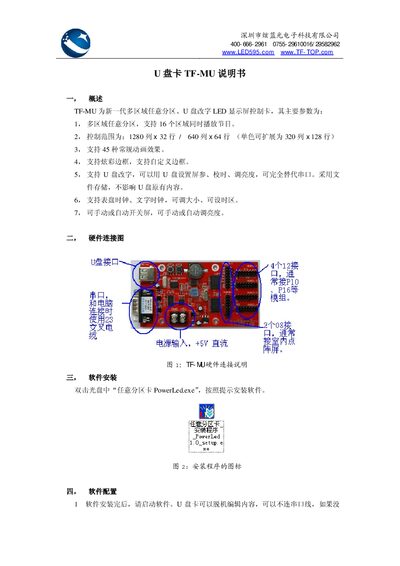
The TF-MU is a next‑generation multi‑region, arbitrary‑partition LED display controller that supports up to 16 zones, various animation effects, and USB‑based configuration. It can replace traditional serial‑port setups and offers clock displays, brightness control, and automatic screen on/off.
This manual covers hardware wiring, software installation (PowerLed.exe), screen parameter configuration, program creation, exporting programs to a USB drive, error‑code explanations, and the physical/electrical specifications of the controller. This manual is written in Chinese.
| PCB length | 110 mm |
|---|---|
| PCB width | 60 mm |
| Operating voltage | +4.5V – +5.5V |
| Normal operating current | 60 mA – 100 mA |
| Current while reading USB | 100 mA – 500 mA |
| Operating temperature range | -20 °C – 60 °C |
| Operating humidity range | 0 % – 85 % RH (no condensation) |
Insert the CD and double‑click “任意分区卡 PowerLed.exe”, then follow the on‑screen prompts to install the software.
Select the “文件 → 导出到 U盘” menu, choose the desired options, and click “确定保存” to write the program to the USB drive.
E004 means the screen parameters are incorrect or corrupted when modifying them via USB.
The screen will show “USB” while copying, then “OK” when the transfer finishes; an “E00x” code indicates an error.