
User manual for the WeiHuang WHPOS58 thermal micro printer covering performance specs, operation steps, command set and character sets.
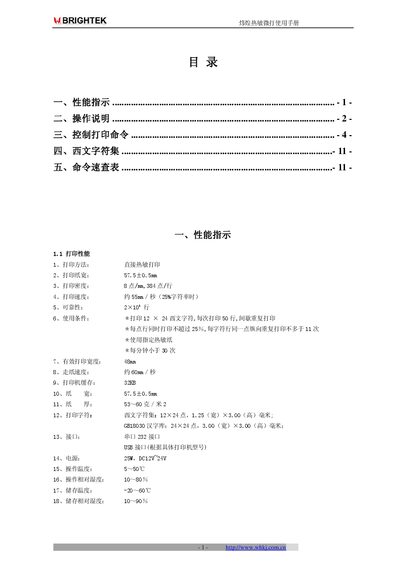
This manual provides detailed information on the WeiHuang WHPOS58 thermal micro printer, including its performance indicators, operating instructions, and the full set of control commands. It also lists the supported Western character set and includes a quick reference table for common commands.
The document explains how to configure the printer’s interfaces, adjust settings such as print direction, baud rate, and line spacing, and describes barcode, graphics, and cash drawer commands. It is intended for end‑users and technicians who need to set up, operate, and maintain the printer. This manual is written in Chinese.
| Paper width | 57.5±0.5 mm |
|---|---|
| Print density | 8 dots/mm, 384 dots/line |
| Print speed | ≈55 mm/s (25 % duty) |
| Reliability | 2 × 10⁶ lines |
| Paper thickness | 53–60 g/m² |
| Interface | Serial 232, USB (model dependent) |
| Power consumption | 25 W, DC 12‑24 V |
| Operating temperature | 5 °C – 50 °C |
| Storage temperature | -20 °C – 60 °C |
| Printer cache | 32 KB |
Power on the printer while holding the LF key and the SET key; the printer will print a self‑test strip.
Turn off the printer, hold any key while powering it on to display the status report, then press LF to select forward (LF) or reverse (SET) direction and power cycle again.