
User manual for Videoporama 0.7, software that turns images into slideshow videos in dv, vcd, svcd, dvd, flv and h264 formats.
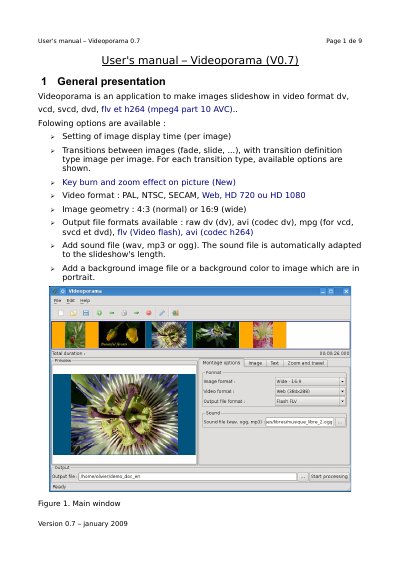
Videoporama 0.7 is an application that makes image slideshows in video format dv, vcd, svcd, dvd, flv and h264 (mpeg4 part 10 AVC). This user manual presents the main window and then walks through the quick guide: adding and removing images, setting slideshow options, setting options for a single image, adding text over an image, and defining a key burn and zoom effect.
The manual also covers exporting the project, saving it as a .idv file, checking the configuration of external binaries and temporary folders, and installing the application with its distutils setup script. Version 0.7 is dated January 2009.
| Output video formats | dv, vcd, svcd, dvd, flv and h264 (mpeg4 part 10 AVC) |
|---|---|
| Video format choices | PAL, NTSC, SECAM, Web, HD 720, HD 1080 |
| Image geometry | 4:3 (normal) or 16:9 (wide) |
| Output file formats | RAW dv, AVI (codec dv), VCD/SVCD/DVD (.mpg), FLV (.flv), H264 (.avi) |
| Accepted sound file formats | wav, ogg and mp3 |
| Background image requirement | 768x576 pixels, jpeg or png |
| Installation command | python setup.py install |
It creates image slideshows in video format dv, vcd, svcd, dvd, flv and h264 (mpeg4 part 10 AVC).
Uncompress the tar.gz file in a folder of your choice, go to that folder in a shell and, as root, run the installation command.
Execute the videoporama command in a shell; a desktop shortcut or menu entry can also be created.
Yes, the project parameters can be saved in a .idv file through the File -> Save menu or the corresponding icon.