
The VGUS Virtual Serial Port Screen User Manual explains how to install, configure, and use the virtual screen and serial debugging tools.
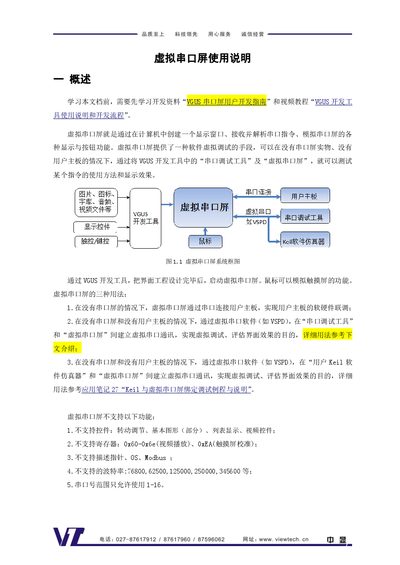
The Virtual Serial Port Screen provides a software‑based method for simulating a serial‑interface display and touch screen without needing the physical hardware. It allows developers to test serial commands, display effects, and button functions by creating a window that mimics a real serial screen.
The manual describes the required tools (VGUS development tool, serial debug tool, and VSPD virtual serial port software), how to install and bind virtual COM ports, configure baud rates and port numbers, and perform communication and debugging between the serial debug tool and the virtual screen. Step‑by‑step procedures and screenshots guide users through creating virtual port pairs, sending commands, and interpreting communication logs. This manual is written in Chinese.
| Supported serial port number range | 1‑16 |
|---|---|
| Unsupported baud rates | 76800, 62500, 125000, 250000, 345600 |
The virtual screen does not support rotating controls, some basic graphics, list display, video controls, certain registers (0x60‑0x6e, 0xEA), description pointers, OS, Modbus, and several high baud rates.
Open the virtual serial port driver, select a COM port for the first port (e.g., COM7) and another for the second port (e.g., COM8), then click “Add pair” to bind them.