
Key facts
- Manuals
- 2
- Languages
- ZH
- Last added
- 2026-10-03
Featured VGUS manuals
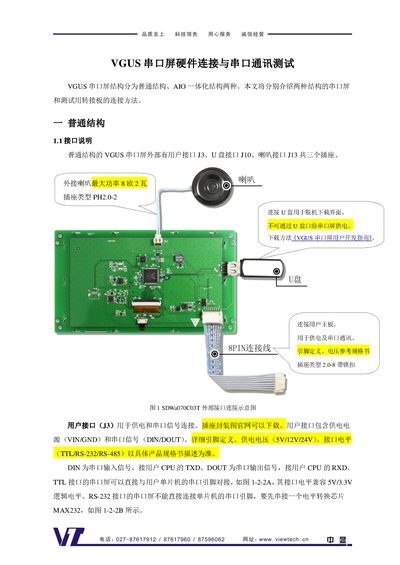
VGUS SDWa & SDWn Series Serial Screen User Manual
The guide covers two hardware structures of VGUS serial screens: the normal structure with separate user connectors (J3, J10, J13) and the AIO integrated structure that uses a single 10‑pin FPC connector. Detailed pin definitions, supported voltage levels (TTL, RS‑232, RS‑485) and power requirements (5 V/12 V/24 V for normal, 5 V for SDWa AIO, 3.3 V for SDWn AIO) are provided.
Adapter boards (DLB07, AIO01, AIO03, AIO035) simplify connections to a host board, USB, speakers, USB drives and TF cards. The DLB07 board includes a CP2102 USB‑to‑UART bridge and driver installation instructions. The manual also describes step‑by‑step serial communication testing using register read commands and the VGUS development tool. This manual is written in Chinese.
Covers: 普通结构 · 接口说明 · 转接板 DLB07 与 VGUS 串口屏的连接 · SDWa 系列 AIO 一体化结构 · 转接板 AIO01 与 SDWa 系列 AIO 串口屏的连接 · SDWn 系列 AIO 一体化结构
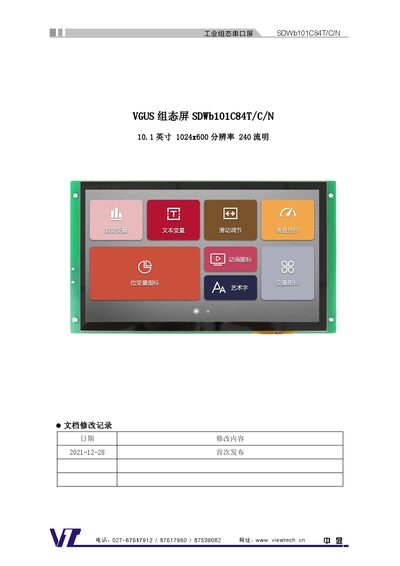
VGUS SDWb101C84T/C/N Industrial HMI Serial Screen Datasheet
The VGUS SDWb101C84T/C/N is a 10.1‑inch industrial HMI serial screen with a 1024×600 resolution, 64K true‑color display and adjustable LED backlight up to 240 cd/m². It supports multiple interfaces including camera (PH2.0‑4), speaker (PH2.0‑2), TF‑card slot and a locked 2.0‑8 pin serial connector, and offers features such as multi‑language fonts, image and video playback, and sleep mode to reduce power consumption.
The datasheet details the device’s electrical parameters (6‑35 V supply, selectable 4.5‑5.5 V via jumper, up to 260 mA current), serial communication settings (1200‑921600 bps, TTL/CMOS/RS‑232 selectable), memory options (16 MB default, expandable to 128 MB or 512 MB), and mechanical data (dimensions, weight, packaging). It also lists recommended debugging tools and provides links to development documentation and software downloads. This manual is written in Chinese.
Covers: External Interface · Product Features · Specification Parameters · EMI Test · Dimensions · Packaging
Latest VGUS manuals
VGUS SDWa & SDWn Series Serial Screen User Manual
User Manual 9 pages · 852 KB · ZHThis manual explains hardware connections, interface definitions, power options, adapter boards, driver installation, and serial communication testing for…
VGUS SDWb101C84T/C/N Industrial HMI Serial Screen Datasheet
Datasheet 7 pages · 1.8 MB · ZHThe VGUS SDWb101C84T/C/N industrial HMI serial screen datasheet provides specifications, interfaces, dimensions, power options, and accessories.
Which document do I need?
User Manual
Day-to-day operation, settings and troubleshooting. Start here if the product is already set up.
Datasheet
Ratings, dimensions and ordering codes, for selection and design work.
Questions answered in VGUS manuals
How can I verify that serial communication with the VGUS screen is working?
Send the read‑register command A5 5A 03 81 00 01 to register 0x00; a correct response A5 5A 04 81 00 01 43 indicates the communication is functional.
What power sources can be used for the VGUS serial screens?
Small (≤5‑inch) screens can be powered directly from a computer USB port, while larger screens require external power (5 V, 12 V or 24 V) connected to the J3 connector.
What is the power supply voltage range for the SDWb101C84T/C/N screen?
The screen operates from 6 V to 35 V by default, and a jumper can set the supply to 4.5 V–5.5 V.
From: VGUS SDWb101C84T/C/N Industrial HMI Serial Screen Datasheet
How can the serial interface level be configured?
The serial interface level can be set via software to TTL, CMOS, or RS‑232 compatible levels.
From: VGUS SDWb101C84T/C/N Industrial HMI Serial Screen Datasheet