
The TX-D1 media player manual provides setup, network configuration, program creation, and operation instructions for LED display screens.
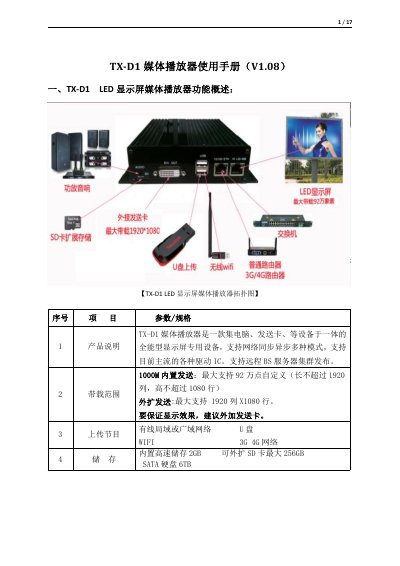
The TX-D1 is an all‑in‑one media player for LED display screens, integrating a computer, transmission card and other components. It supports multiple network modes, various driver ICs, and can handle up to 1.92 M pixels (1920 × 1080) with optional external transmission cards.
The accompanying TX‑16A software allows users to configure screen parameters, manage programs, set brightness, volume, and network settings, and update firmware. Programs can be created with text, images, video, weather, and clock widgets, then uploaded via network or USB for playback on the screen. This manual is written in Chinese.
| Built‑in storage | 2 GB, expandable to 256 GB SD card or 6 TB SATA HDD |
|---|---|
| Supported resolution (internal transmission) | Up to 1920 × 1080 (max 920 k points) |
| Supported resolution (external transmission) | 1920 × 1080 |
| Physical dimensions | 255 mm × 155 mm × 40 mm |
The device defaults to the IP address 192.168.0.77 when connected directly to a computer.
Open the Brightness Settings window and configure a custom schedule or manual level according to the usage environment.