
Teledyne LeCroy user manual for the PCIe External Cable 3.0 to PCIe Slot Adapter, covering setup, switch settings, signals, and test points.
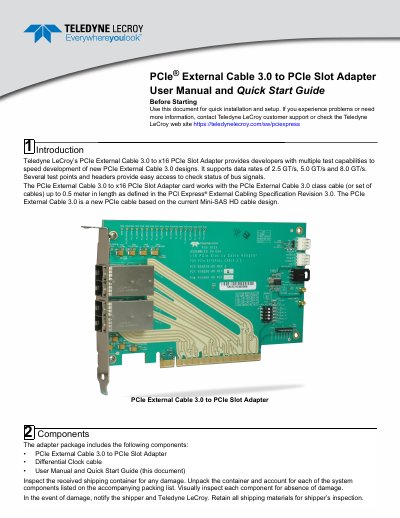
This Teledyne LeCroy user manual and quick start guide supports setup of the PCIe External Cable 3.0 to x16 PCIe Slot Adapter. The adapter supports data rates of 2.5 GT/s, 5.0 GT/s, and 8.0 GT/s for developing PCIe External Cable 3.0 designs.
The package includes the adapter, a differential clock cable, and this document. It describes connections, SW1 link width configurations, I2C and sideband connector signals, test points, and operating and non-operating environmental conditions.
| Data Rate | 2.5 GT/s, 5.0 GT/s, 8.0 GT/s |
|---|---|
| Maximum Cable Length | 0.5 meter |
| Operating Temperature | 32° F to 122° F (0° C to 50° C) |
| Operating Humidity | 10% to 90% RH (non-condensing) |
It supports data rates of 2.5 GT/s, 5.0 GT/s, and 8.0 GT/s.
It works with PCIe External Cable 3.0 class cables up to 0.5 meter in length.
The factory settings are SW1-1 OFF, SW1-2 ON, SW1-3 OFF, and SW1-4 OFF.