
The Sharp PW-M850 electronic dictionary user manual provides step‑by‑step instructions for battery installation, power operation, menu navigation, and…
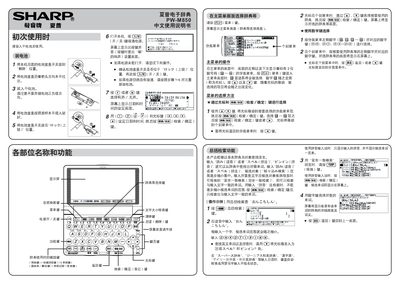
This manual explains how to install dry‑cell batteries, power on the device, and configure basic settings such as date, time, and sound mode. It then describes the layout of the main menu, how to select dictionaries, and the various input methods available.
Detailed sections cover the general search function, the S‑Jump (simultaneous reference) feature, pinyin tone input, and the use of classification tags to filter results. Each operation is illustrated with key‑press sequences and screen examples. This manual is written in Chinese.
| Battery type | dry cell battery |
|---|
Press the S‑Jump key to view matching entries across multiple dictionaries at the same time.
After typing the pinyin letters, press the tone key repeatedly to cycle through tones 1 to 4.