
The Roemheld 25-200kN assembly press manual provides specifications, operation modes, safety features, and installation instructions.
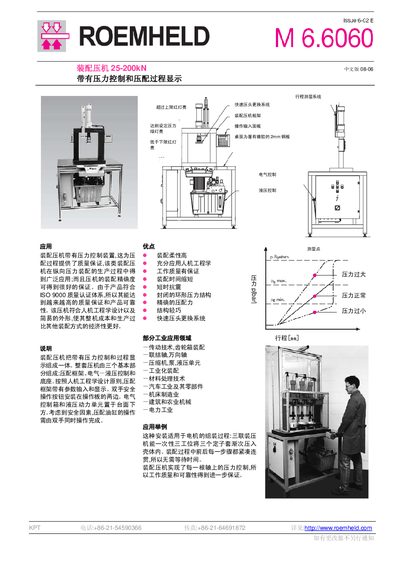
The Roemheld 25-200kN assembly press is designed for industrial assembly tasks such as gear‑box, universal joint, compressor, pump, and machine‑tool assembly. It features pressure control with visual indicators, a lightweight frame, ergonomic design, and a quick‑head‑change system that improves productivity and ensures consistent assembly quality.
The manual describes automatic and setting modes, dual‑hand safety operation, data input via PLC, RS232 data output, and detailed installation steps. Technical specifications, model codes, and ordering information are provided to help users select the appropriate configuration and perform safe, precise assembly operations. This manual is written in Chinese.
| Rated Pressure | 25‑100 kN |
|---|---|
| Maximum Working Pressure | 200 bar |
| Rated Power | 0.75‑2.2 kW |
| Oil Tank Volume | 27‑40 L |
| Flow Rate | 1.5‑5.1 L/min |
| IP Protection Rating | IP54 |
| Feed Speed | 20 mm/s |
| Fast Eject Speed | 78 mm/s |
The quick head change system allows the head to be released by pushing the outer ring with a hand, enabling fast removal and re‑installation without tools.
The press requires both hands to operate the cylinder simultaneously, using double‑hand safety buttons on the control panel.
Red lights show over‑limit or under‑limit pressure, while a green light indicates the set pressure has been reached.
Press the flashing reset button to reset the cylinder; an indicator light confirms the reset is complete.