
Quick guide for printing on a Ricoh LAN printer with an Octopus card, including PIN entry, print job selection, and printing charges.
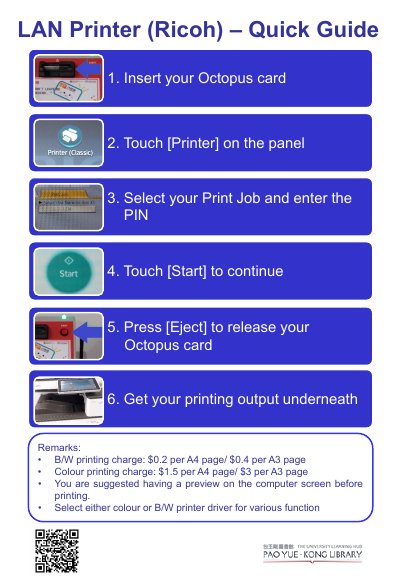
This quick guide explains how to print on a Ricoh LAN printer using an Octopus card. It covers inserting the card, selecting a print job, entering the PIN, starting the job, ejecting the card, and collecting the printed output.
The guide also lists B/W and colour printing charges for A4 and A3 pages, suggests previewing the file on the computer screen before printing, and advises selecting the colour or B/W printer driver for the required function.
| B/W printing charge | $0.2 per A4 page / $0.4 per A3 page |
|---|---|
| Colour printing charge | $1.5 per A4 page / $3 per A3 page |
Insert your Octopus card, touch [Printer] on the panel, select your print job, enter the PIN, and touch [Start] to continue.
Press [Eject] to release your Octopus card, then collect the printing output underneath.
B/W printing costs $0.2 per A4 page or $0.4 per A3 page. Colour printing costs $1.5 per A4 page or $3 per A3 page.
You are suggested to have a preview on the computer screen before printing.