
ResMed user guide for the Air10 and S9 USB adapters, covering setup, removal, cleaning, compatible software and technical specifications.
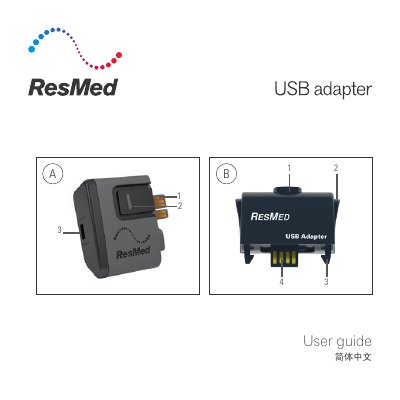
This is the ResMed user guide for the Air10 USB adapter and the S9 USB adapter. Used with ResMed devices, the adapters transmit patient therapy data between the device and Tx Link for sleep studies; the Air10 USB adapter is compatible with AirSense 10 / AirCurve 10 devices and the S9 USB adapter with S9 devices. It describes the adapter parts, the installation positions on each device, software compatibility (AirView for Air10, ResScan v4.0 or greater for S9) and the setup and removal steps.
The guide also covers cleaning and maintenance, technical specifications such as operating temperature, humidity, altitude, dimensions, weight and design life, the symbols that may appear on the adapter or packaging, environmental disposal information, warnings and cautions, and a reference to the device User Guide for the limited warranty. The document is multilingual, with the English text first, followed by other languages.
| Operating temperature | +41°F to +95°F (+5°C to +35°C) |
|---|---|
| Operating humidity | 10 to 95% non-condensing |
| Operating altitude | Sea level to 8,500' (2,591 m); air pressure range 1013 hPa to 738 hPa |
| Storage and transport temperature | -4°F to 140°F (-20°C to +60°C) |
| Storage and transport humidity | Air10: 5 to 95% non-condensing; S9: 10 to 95% non-condensing |
| Design life | Air10: 1,825 connections; S9: 1,825 connections |
| Gross dimension Air10 (W x D x H) | 2.1” x 1.2” x 2.0” (54 mm x 30 mm x 51 mm) |
| Gross dimension S9 (L x W x H) | 1.74” x 2.12” x 0.91” (44.35 mm x 54.10 mm x 23.30 mm) |
| Weight | Air10: 0.88 oz (25 g); S9: 0.77 oz (22.1 g) |
| Ingress protection | IP21 applies only to the S9 USB adapter without USB cable attached; IP22 applies only to the Air10 USB adapter |
The Air10 USB adapter is compatible with AirSense 10 / AirCurve 10 devices. The S9 USB adapter is compatible with S9 devices.
AirView is listed for Air10 and ResScan v4.0 or greater for S9. A full list of compatible software is in the Data Management Device Compatibility List on www.resmed.com.
Disconnect the device from the power outlet, remove the adapter and wipe its exterior with a clean, dry cloth. The contacts do not require cleaning.
No. The USB adapter is not designed to be serviced and has no serviceable parts inside; it must not be opened or modified.