
User manual for Omron ZXL-207 function block to read high threshold from Smart Sensors via serial port.
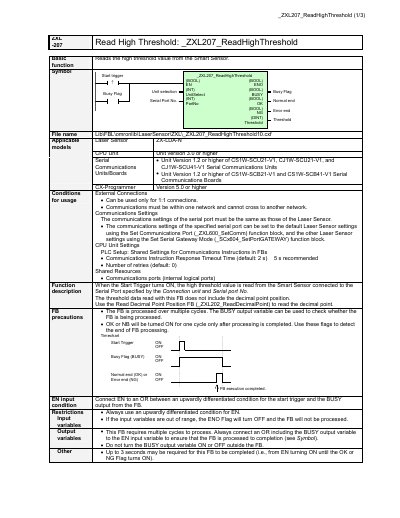
This document explains how to use the _ZXL207_ReadHighThreshold function block to read high threshold values from Smart Sensors connected via serial ports. It covers input/output variables, usage conditions, error codes, and application examples. The function requires multiple cycles to complete and uses BUSY, OK, and NG flags to indicate status.
The function supports 1:1 connections within one network and requires compatible serial communication units and CPU units. It can be used with specific Omron models and requires proper communications settings matching the Smart Sensor.
| Applicable Models | Laser Sensor ZX-LDA-N CPU Unit |
|---|---|
| CPU Unit Version | Version 3.0 or higher |
| Serial Communications Units | Unit Version 1.2 or higher of CS1W-SCU21-V1, CJ1W-SCU21-V1, and CJ1W-SCU41-V1 |
| CPU Unit Settings | PLC Setup: Shared Settings for Communications Instructions in FBs |
| Timeout Time | 5 seconds recommended |
| Processing Time | Up to 3 seconds |
EN (BOOL), UnitSelect (INT), PortNo (INT).
ENO (BOOL), BUSY (BOOL), OK (BOOL), NG (BOOL), Threshold (DINT).
Error code #0000 (Normal end), #2203 (Operation error - incorrect setting), #2204 (Operation error - Sensor not in RUN mode).