
The Omron SC100 Digital Scale instruction manual provides safety guidelines, battery installation, measurement steps, troubleshooting, and specifications.
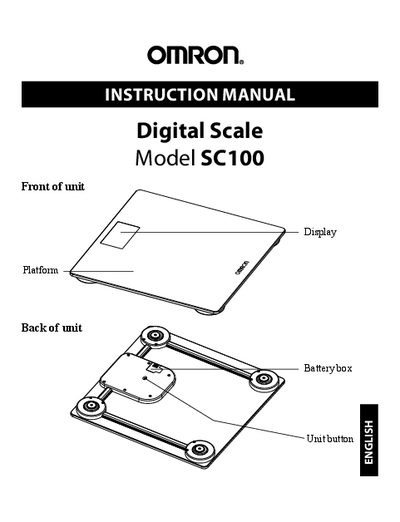
This manual introduces the Omron SC100 Digital Scale, lists safety information, and explains how to install the CR2032 battery and set up the device for accurate measurements. It also covers proper use, care, and maintenance to keep the scale in good condition.
Detailed sections describe how to take a measurement, interpret error indicators, change measurement units, and troubleshoot common issues. The specifications page lists the scale’s weight range, display resolution, power source, operating temperature, dimensions, and warranty information.
| Product Name | Digital Scale |
|---|---|
| Model | SC100 (HN-286-Z) |
| Weight Display | 0 - 400 lb / 0 - 180 kg |
| Minimum Display Unit | 0.2 lb / 0.1 kg |
| Power | 1 × 3 V lithium battery (CR2032) |
| Operating Temperature / Humidity | +41 °F to +95 °F (+5 °C to +35 °C), 30‑85 % RH |
| Battery Life | Approximately 1 year (measured 4 times a day) |
| Dimensions | ≈ 11 ¾" W × ¾" H × 11 ¾" D |
| Weight | ≈ 3.3 lb (including battery) |
Step onto the platform, stand evenly, wait for the display to show a weight in lb or kg, then step off; the scale powers off automatically after a short delay.
The display shows an error indicating the battery is running out; replace the battery with a new 3 V lithium cell.
Press the Unit button on the back of the unit to toggle between lb and kg.