
User manual for the NITECORE EC2 flashlight, covering operation, battery installation, brightness modes, maintenance, and warranty details.
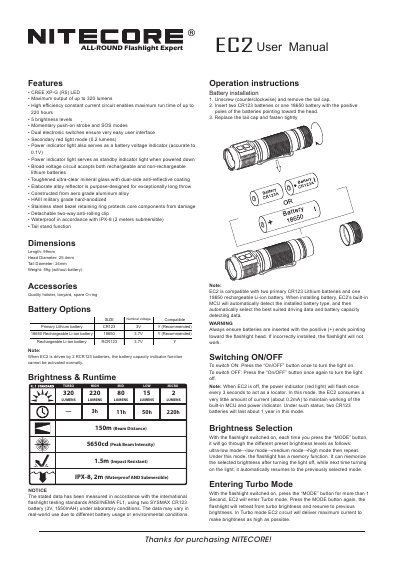
The NITECORE EC2 is an all-around expert flashlight featuring a CREE XP-G (R5) LED with a maximum output of up to 320 lumens. It is constructed from aero grade aluminum alloy with HAIII military grade hard-anodizing and a stainless steel bezel retaining ring. The device offers 5 brightness levels, including a Turbo mode, and includes secondary features such as a red light mode, strobe, and SOS modes.
| LED | CREE XP-G (R5) |
|---|---|
| Maximum output | up to 320 lumens |
| Maximum run time | up to 220 hours |
| Brightness levels | 5 |
| Waterproof rating | IPX-8 (2 meters submersible) |
| Length | 99mm |
| Weight | 59g (without battery) |
| Compatible Primary Lithium battery | CR123 |
| Compatible Rechargeable Li-ion battery | 18650 |
With the flashlight switched on, press the MODE button for more than 1 second to enter Turbo mode.
Press the ON/OFF button for more than 1 second to enter Strobe mode, or press the MODE button for more than 1 second to enter SOS mode.
The power indicator light serves as a battery voltage indicator accurate to 0.1V and also acts as a standby indicator light when powered down.
With the light switched on, press the ON/OFF button for over 1 second to enter lockout mode.