
Key facts
- Manuals
- 4
- Languages
- ZH
- Last added
- 2026-10-03
Featured Nitecore manuals
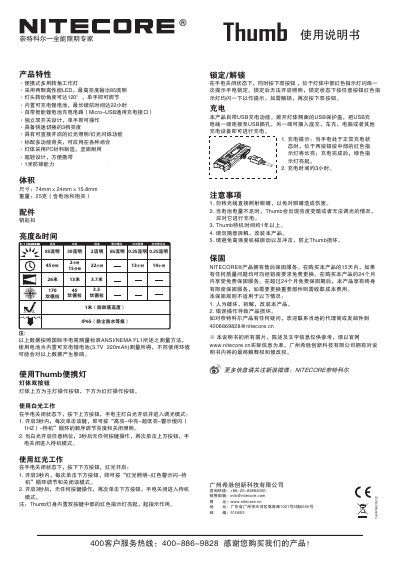
NITECORE Thumb 250222 User Manual
The Thumb is a compact, tiltable work light with two high‑performance LEDs delivering up to 85 lumens. It offers three brightness levels, a red‑light mode, and a 120° adjustable head that can be operated with one hand. The unit is built from durable polycarbonate, weighs 25 g, and is impact‑resistant to 1 m with an IP65 rating.
The manual covers how to switch brightness, lock and unlock the device, charge via the micro‑USB port (≈3 hours full charge), and outlines safety precautions, warranty terms, and accessories such as the key‑ring clip. Technical specifications such as dimensions, battery capacity, and runtime are also provided. This manual is written in Chinese.
Covers: Product Features · Dimensions & Weight · Accessories · Brightness & Runtime · Lockout/Unlock · Charging
Nitecore EZ 123 / CR2 Flashlight User Manual
This manual explains how to install a CR123 or CR2 battery, turn the flashlight on, and adjust its two brightness levels. It also describes the simple twist‑head operation that lets you control the light with one hand.
Maintenance instructions cover battery replacement, cleaning contacts, lubricating the O‑ring, and troubleshooting flicker or no‑light issues. Warranty details and contact information for service are included at the end of the guide. This manual is written in Chinese.
Covers: Getting Started · Battery Installation · Operation · Maintenance · Warranty
Nitecore EZ AA Flashlight User Manual
The EZ AA is a compact, lightweight flashlight designed for easy one‑hand operation. It uses a single AA battery and offers up to 130 lumens of output with an IPX‑8 waterproof rating.
This manual explains how to install the battery, turn the light on and adjust brightness, outlines the product specifications, and provides maintenance tips and warranty details. This manual is written in Chinese.
Covers: Product Features · Getting Started · Battery Installation · Switch and Brightness Adjustment · Brightness and Runtime · Warranty
Nitecore D10 SP & EX10 SP User Manual
This manual provides step‑by‑step instructions for inserting batteries, operating the flashlight, and adjusting brightness levels. It also describes special functions such as hidden SOS rescue signals, burst mode, and tactical illumination mode.
Safety features, waterproof and impact ratings, as well as maintenance tips—including cleaning and lubrication—are covered to ensure reliable, long‑term use of the D10 SP and EX10 SP flashlights. This manual is written in Chinese.
Covers: 开始使用 · 装入电池 · 亮度调节 · SOS求救信号功能及暴内功能 · 战术点亮模式 · 安全锁定
Latest Nitecore manuals
NITECORE Thumb 250222 User Manual
User Manual 2 pages · 1.4 MB · ZHThe NITECORE Thumb 250222 user manual explains features, operation, charging, safety, and warranty for the portable tiltable work light.
Nitecore EZ 123 / CR2 Flashlight User Manual
User Manual 1 pages · 894 KB · ZHThe Nitecore EZ 123 / CR2 flashlight user manual provides battery installation, operation, maintenance, and warranty information.
Nitecore EZ AA Flashlight User Manual
User Manual 1 pages · 652 KB · ZHThe Nitecore EZ AA flashlight user manual provides features, specifications, battery installation, operation instructions, and warranty information.
Nitecore D10 SP & EX10 SP User Manual
User Manual 1 pages · 815 KB · ZHThe Nitecore D10 SP and EX10 SP flashlight user manual explains battery installation, brightness settings, SOS and tactical modes, and maintenance.
Which document do I need?
User Manual
Day-to-day operation, settings and troubleshooting. Start here if the product is already set up.
Questions answered in Nitecore manuals
How do I lock or unlock the Thumb?
Press both switches simultaneously; the red indicator blinks once to show lockout. Press both switches again to unlock.
How do I change the brightness levels?
While the light is on, repeatedly press the upper switch within three‑second intervals to cycle through high, mid, low, and blinking modes.
How do I install the battery?
Insert one battery with the correct polarity; the positive end should face the head of the flashlight.
What warranty does Nitecore provide?
Nitecore offers a 7‑day free replacement, a 12‑month free repair, and a lifetime limited warranty, subject to proper use.
How do I insert the AA battery?
Insert a single AA battery as shown, making sure the positive pole faces the head of the flashlight.
How do I turn the flashlight on and adjust brightness?
Rotate the head clockwise to turn the light on (low mode), continue rotating clockwise to increase brightness, and rotate counter‑clockwise to turn it off.