
This manual provides instructions for the MOZA Air 2 gimbal, covering assembly, camera mounting, balance adjustment, and operation.
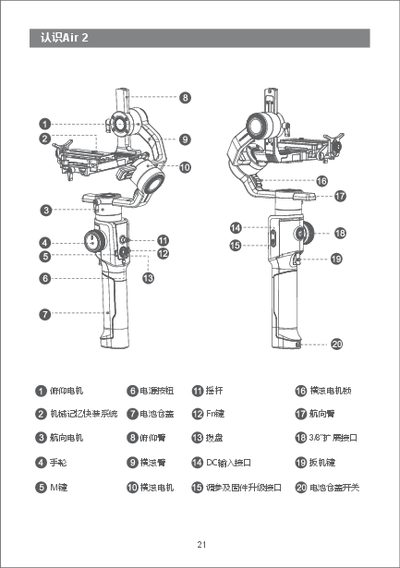
The MOZA Air 2 is a 3-axis gimbal designed for stabilizing cameras. This manual details the product components, including the pitch, roll, and yaw motors, as well as the mechanical memory quick-release system. It explains how to install the tripod, battery, and various camera control cables compatible with different camera interfaces.
The guide also covers the installation of accessories such as the follow focus mount and height extension kit. Detailed procedures for balancing the gimbal across the roll, pitch, and yaw axes are provided to ensure optimal performance, along with instructions for operating the screen and control buttons. This manual is written in Chinese.
The bottom of the Air 2 features a 1/4" screw hole and a 3/8" screw hole.
The unit comes with four camera control cables stored in the accessory bag.