
Guide to configuring manual cellular settings on a Monnit IoT Gateway, including APN, SIM authentication, bands, and troubleshooting.
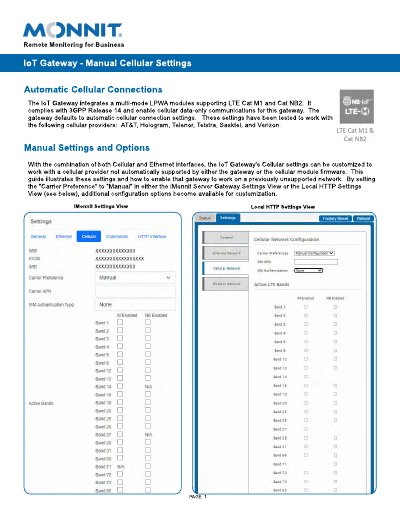
The Monnit IoT Gateway uses Cellular and Ethernet interfaces. This guide explains how to set Carrier Preference to Manual in the iMonnit Server Gateway Settings View or the Local HTTP Settings View so additional cellular options become available.
The guide covers APN, SIM authentication type, cellular bands, provider information, connection confirmation, and advanced troubleshooting through the LTE Module Console Viewer. It also lists AT commands and expected responses for troubleshooting.
| Cellular technology | LTE Cat M1 and Cat NB2 |
|---|---|
| Cellular standard | 3GPP Release 14 |
| Communications | Cellular data-only |
| Interfaces | Cellular and Ethernet |
| Default tested cellular providers | AT&T, Hologram, Telenor, Telstra, Sasktel, and Verizon |
Set “Carrier Preference” to “Manual” in the iMonnit Server Gateway Settings View or the Local HTTP Settings View.
The APN can be left blank to request it from the tower, or specified to pre-configure the connection.
None, PAP, and CHAP are supported; PAP and CHAP make Username and Password fields visible.
Check that the bottom gateway indicator is green and stable, or view status.htm and verify cellular status is connected.