
Quick installation guide for MOBOTIX S15D Thermal Sensor Module with thermal imaging and weatherproof IP66 housing.
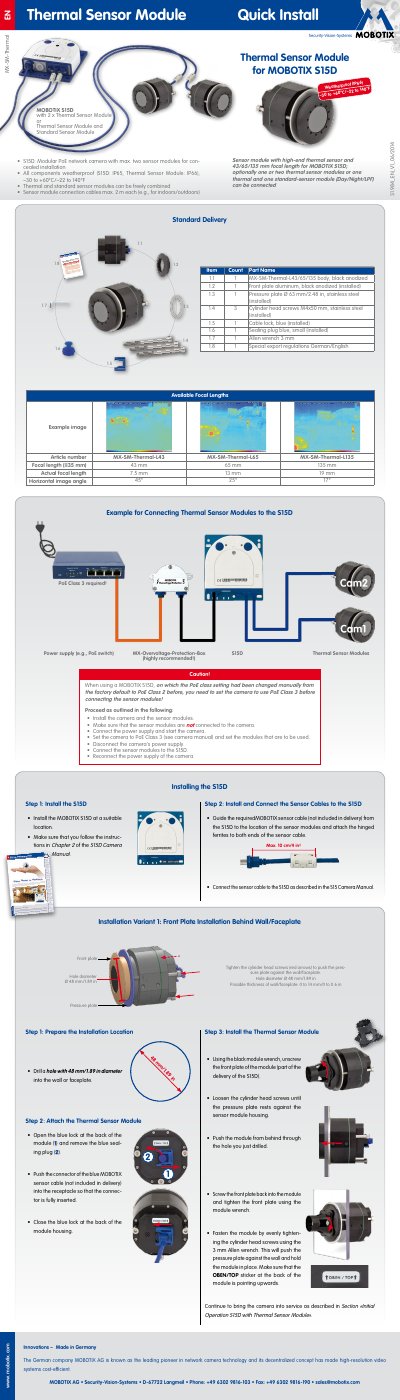
This guide provides step-by-step instructions for installing the MOBOTIX Thermal Sensor Module with the S15D camera. It covers front plate and screw mounting variants, component parts, and power requirements. The module is weatherproof (IP66) and compatible with PoE Class 3. Installation requires following the S15D Camera Manual for full setup.
| Focal Length Options | L43 (45°), L65 (25°), L135 (17°) |
|---|---|
| Sensitivity | NETD typ. 50 mK (equals 0.05°C), <79 mK |
| Temperature Measurement Range | –40 to +550°C/–40 to 1,022°F |
| Max. Frame Rate | 9 fps |
| Operating Temperature | –30 to +60°C/–22 to 140°F |
| Power Consumption | Typically 1.5 W per Thermal Sensor Module |
| IP Rating | IP66 (Thermal Sensor Module), IP65 (S15D) |
No, glass panes block thermal radiation and must not be between the module and objects to be observed.
The Thermal Sensor Module requires MX-V4.2.1 or higher on the MOBOTIX S15D.
No, it does not have a microphone or LEDs. External microphone is required if needed, and camera status is shown only by LEDs on the camera body.