
User's guide for the MK MK204A IDT overcurrent relay, covering indicators, buttons, trip contacts, electrical specifications, wiring, and dimensions.
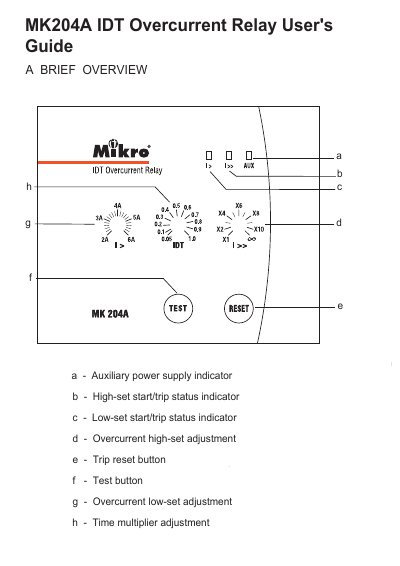
The MK MK204A IDT overcurrent relay user's guide describes the relay's indicators, adjustment controls, push buttons, and trip contacts. It covers low-set and high-set overcurrent adjustments, time multiplier settings, and LED status indications.
Technical data includes setting ranges, auxiliary supply voltages, trip contact ratings, mechanical indicators, panel mounting dimensions, and connection diagrams.
| Overcurrent low-set setting range | 2A to 6A |
|---|---|
| Overcurrent high-set setting range | 1x to 10x of low-set |
| Time multiplier range | 0.05 to 1.0 |
| Auxiliary supply MK204A-240A | 198~265 VAC |
| Auxiliary supply MK204A-110A | 94~127 VAC |
| Supply frequency | 50Hz |
| Trip contact rated voltage | 250 VAC |
| Continuous carry | 5A |
| Expected electrical life | 100,000 operations |
| Expected mechanical life | 5 million operations |
| Mounting | Panel mounting |
| Front panel size | Standard DIN 96x96 mm |
| Approximate weight | 0.7 kg |
Press the reset button once.
It is adjustable from 2A to 6A.
The AUX indicator is on while l> and l>> are off.
It uses 198~265 VAC.