
This supplement for Fiery XF 7.1 details driver selection, special settings for white and clear ink printing, and media constraints for Mimaki UCJV150-160…
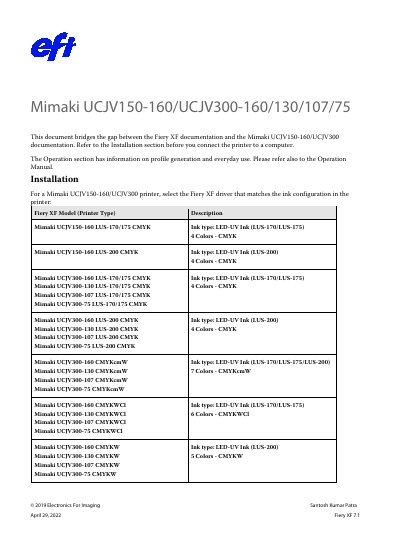
This document serves as a supplement to the Fiery XF documentation, bridging the gap between Fiery XF and Mimaki UCJV150-160/UCJV300 documentation. It provides instructions on selecting the appropriate Fiery XF driver based on the printer's ink configuration (LUS-170/175, LUS-200, CMYKcmW, etc.) and notes that the drivers are available for Windows only.
| Supported Operating System | Windows only |
|---|---|
| Recommended USB Driver Version | 4.2.0 or later |
| Supported Media Types | PVC, TARPAULIN, PET, PAPER, SYNTHETIC PAPER, FABRIC |
No, Macintosh OS X is not supported for these printers.
The recommended mode is 'Bounding box', which adds white to every pixel in the image rectangle.