
MERCURY 7108502247 PoE Audio IR Network Camera Quick Installation Guide

This quick installation guide covers the setup, disassembly, and configuration of the MERCURY 7108502247 PoE audio IR network camera with NVR and PC.
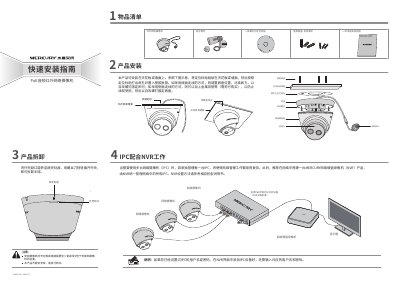

MERCURY 7108502247 PoE Audio IR Network Camera Quick Installation Guide - cover page
Brand
Mercury
Document type
Installation Guide
Language
Chinese
Pages
2
File format
PDF
File size
2.4 MB
Published
16 October, 2026
Updated
16 October, 2026
MD5 checksum
BFEE5E751E6B5F9447FACD6FB311CBFA

About this manual

This document provides a quick installation guide for the MERCURY 7108502247 PoE audio IR network camera. It details the steps for installing the camera on a ceiling or wall, including the use of the provided waterproof kit and mounting stickers. The guide also explains how to disassemble the dome shell for maintenance. This manual is written in Chinese.

What's inside

  • Product List
  • Product Installation
  • IPC with NVR
  • IPC with PC
  • Product Disassembly
  • Technical Support
  • Product Warranty
  • Web Management Interface

Frequently asked questions

What is the default IP address to access the camera's web management interface?

The default management address is 192.168.1.60.

What is the default username for the first login to the camera?

The default username is admin.

What is the maximum weight the ceiling or wall must support for installation?

The ceiling or wall must support at least 3 times the total weight of the bracket and camera.

Download PDF (2.4 MB)

More Mercury Manuals


View all Mercury manuals →