
User manual for Linear Technology's Linduino One DC2026A, an Arduino-compatible board for interfacing with Linear demo boards via I2C and SPI.
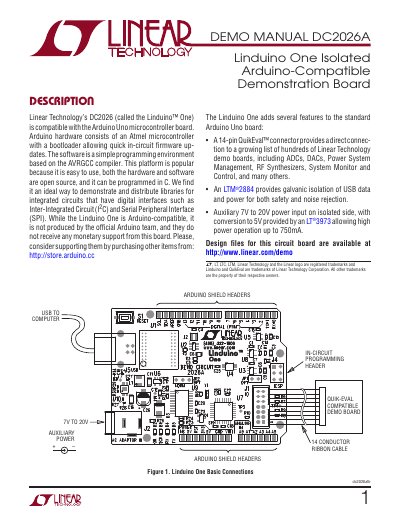
The Linduino One DC2026A is an Arduino-compatible development board designed for interfacing with Linear Technology’s demo boards. It features a 14-pin QuikEval connector for direct connection to hundreds of Linear demo boards, galvanic isolation via an LT M®2884 for USB data and power, and an auxiliary 7V–20V power input with a LT®3973 converter for high-power operation up to 750mA. The board comes preloaded with a DC590 emulator program for testing with QuikEval software. It supports programming via Arduino IDE and includes a terminal-based demonstration program for library functions. The board also features LEDs for status indication and headers for shield compatibility and in-circuit programming.
| Isolation | LT M®2884 for USB data and power |
|---|---|
| Auxiliary Power | 7V to 20V input, converted to 5V |
| Microcontroller | ATMega328P-AU |
| USB Interface | FT232RL |
| Power Supply | 5V from USB or auxiliary input |
Download and run the Linear Technology installer, then install QuikEval and the Arduino IDE. Set the Sketchbook location in the Arduino IDE to the extracted L TSketchbook.zip file.
The 14-pin QuikEval connector allows direct connection to hundreds of Linear Technology demo boards, providing interfaces for I2C, SPI, and power.
Connect the board to a PC and open the Serial Monitor at 115200 baud. You should see a "hello" message, indicating successful serial communication.