
This document explains how to set LED brightness using dip‑switches in manual control mode.
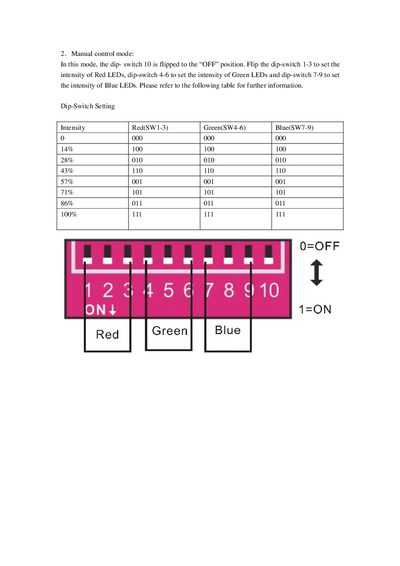
The LED Control Module can be operated in manual control mode by configuring dip‑switches. Switch 10 must be set to the OFF position, while switches 1‑3 control the red LED intensity, 4‑6 control the green LED intensity, and 7‑9 control the blue LED intensity.
A table provides the corresponding brightness percentages for each dip‑switch combination, ranging from 14% to 100% total intensity.
Set dip‑switch 10 to OFF, then use switches 1‑3 for red, 4‑6 for green, and 7‑9 for blue intensity as shown in the table.
The setting 111 yields 100% LED brightness.