
User manual for the KomShine KFL-11M 650nm red light visual fault locator, covering operation, troubleshooting, precautions and specifications.
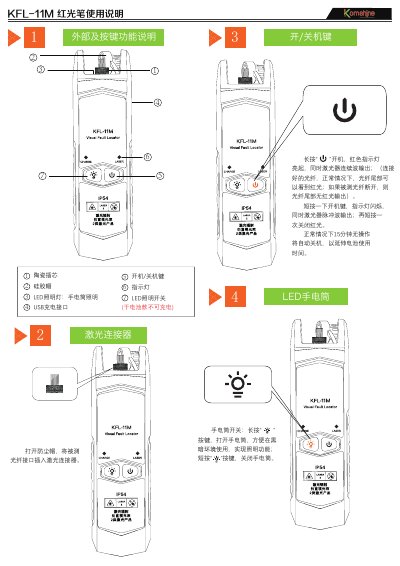
This manual describes the KFL-11M red light pen (visual fault locator), a fiber testing tool built around a 650nm semiconductor laser driven by a constant current source. Connected to a single-mode or multimode fiber, it outputs stable red light for fiber break and fault detection, and is used in fiber construction, network maintenance and optical device production and research.
The document explains the device layout (ceramic ferrule, silicone cap, LED flashlight, USB charging port), continuous-wave and 2Hz pulse operation, the auto power-off function, flashlight use, troubleshooting such as weak LED display or failure to power on, safety precautions, and the specifications of the four power variants VFL-11M-1, -10, -20 and -30. This manual is written in Chinese.
| Wavelength | 650nm |
|---|---|
| Output power options | 1mW, 10mW, 20mW, 30mW |
| Test distance | 1mW: 3-5km; 10mW: 8-10km; 20mW: 15-20km; 30mW: 25-30km |
| Runtime | 30 hours (1mW) |
| Power supply | AAA 1.5V battery x 2 / 1000mAh lithium battery |
| Charging port | USB interface (rechargeable version only) |
Yes, after 15 minutes without operation it shuts down automatically to extend battery life.
Long-press the flashlight key to turn it on for lighting in dark environments, and short-press it to turn the flashlight off.
Low battery may be the cause; charge the device, or restart it and then charge.