
This manual is the instruction manual of KPN-35 PON optical power meter, which introduces the characteristics and usage of the product.
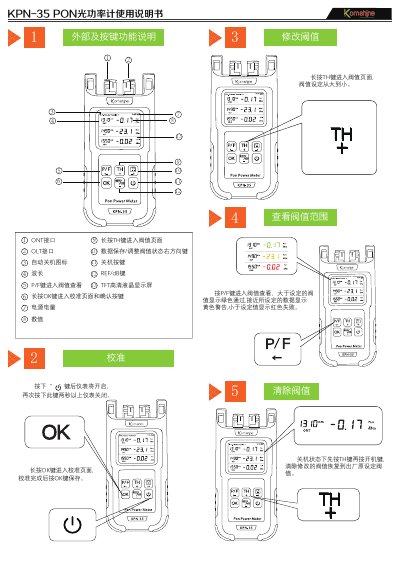
This user manual describes the operation of the KomShine KPN-35 PON Optical Power Meter, designed for testing OLT devices in FTTx/PON networks. It supports simultaneous measurement of signal power for voice, data, and video connections across three wavelengths: 1310nm, 1490nm, and 1550nm. The device features threshold settings with pass, warning, and fail modes, and can store up to 1,000 test results via USB. It includes automatic shutdown, manual calibration, and a silicone protective case.
The manual covers usage instructions, safety warnings, environmental conditions, and standard configuration options including data saving and threshold clearing. This manual is written in Chinese.
| Display Type | TFT HD LCD |
|---|---|
| Wavelengths Supported | 1310nm, 1490nm, 1550nm |
| Threshold Modes | Pass, Warning, Fail |
| Data Storage Capacity | 1,000 measurements |
| USB Function | Data transfer |
| Automatic Shutdown | Yes (cancelable) |
It can measure three wavelengths: 1310nm, 1490nm, and 1550nm.
Yes, it can store up to 1,000 test results via USB.
Press and hold the TH key to enter the threshold page; values are set from high to low.
It displays red to indicate failure.