
Jabra Speak2 75 User Manual

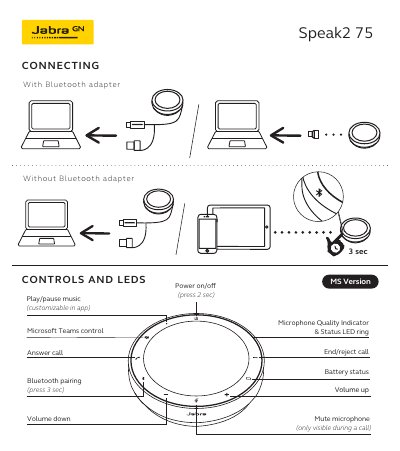
User guide for the Jabra Speak2 75 with controls, Bluetooth pairing, volume, and microphone quality indicators.

Jabra Speak2 75 User Manual - cover page
Brand
Jabra
Category
Audio-Video Decoder
Document type
User Manual
Language
English
Pages
3
File format
PDF
File size
396 KB
Published
01 November, 2026
Updated
01 November, 2026
MD5 checksum
1E6806FB96A94ECC926A66DB2E5726D1

About this manual

This manual explains how to use the Jabra Speak2 75, including connecting controls, LEDs, Bluetooth pairing, volume, and microphone quality indicators. It also provides links to user manuals in multiple languages.

The device features power on/off, mute, call controls, and battery status indicators. Microphone quality is shown via an LED ring, and volume can be adjusted with dedicated buttons.

What's inside

  • Connecting Controls and LEDs
  • Power On/Off
  • Mute Microphone
  • Call Controls
  • Microphone Quality Indicator
  • Battery Status
  • Bluetooth Pairing
  • Volume Controls
  • Play/Pause Music
  • User Manuals in Regional Languages

Frequently asked questions

How long must you press the button to start Bluetooth pairing?

You must press the button for 3 seconds to initiate Bluetooth pairing.

What happens to the microphone control when the device is not in a call?

The microphone control is only visible during a call.

Download PDF (396 KB)

More Jabra Manuals


View all Jabra manuals →