
Quick installation guide for the Iridium TT6000v24 device, covering module positioning, 24-pin harness connections, and testing procedures.
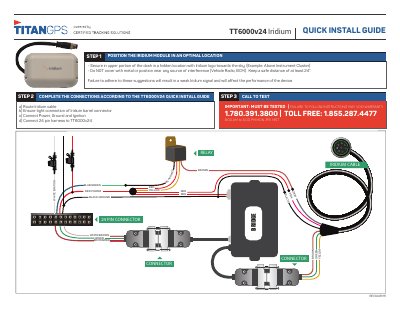
This guide provides instructions for installing the Iridium TT6000v24 module. Step 1 details positioning the module in an optimal location, such as the upper portion of the dash, ensuring the Iridium logo faces the sky, and maintaining a safe distance of at least 24 inches from interference sources like vehicle radios or the BCM. Do not cover the module with metal.
Secure the module in the upper portion of the dash in a hidden location with the Iridium logo towards the sky.
Keep a safe distance of at least 24 inches from sources like vehicle radios or the BCM.
Covering the module with metal will result in a weak Iridium signal and affect device performance.