
This is a simplified Chinese user manual for the ICOM 1ID-E880 radio, covering panel buttons, menu functions, channel storage, and microphone settings.
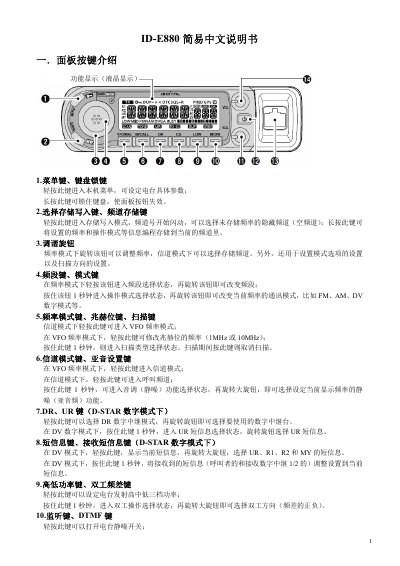
This document serves as a simplified Chinese user guide for the ICOM 1ID-E880 radio. It provides instructions on operating the device's panel buttons, including frequency adjustment, mode selection, and scanning functions. The manual details how to access the main menu to configure settings such as frequency steps, duplex offsets, and digital modes like D-STAR and DV. This manual is written in Chinese.
Press and hold the power switch key for one second to either open or close the radio's power.
The DATATX DV function defaults to being enabled during low-speed data operations.
The scan pause timer defaults to a stay time of 10 seconds when a signal is received.