
Quick start guide for the HDS Carbon device, covering key functions, navigation, settings, and usage instructions.
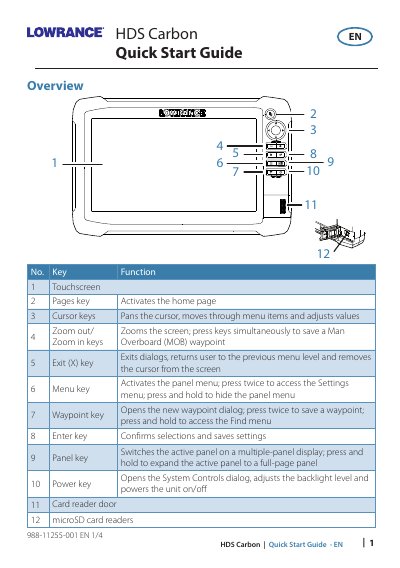
The guide provides an overview of the HDS Carbon’s main functions, including touchscreen operation, cursor keys, zoom, menu navigation, waypoint creation, and power controls. It explains how to access and customize panels, hide menus, and adjust display settings such as brightness and night mode.
Additional sections describe sonar-specific features like StructureScan® frequencies, fishing mode presets, and how to view sonar history. Instructions are included for creating and saving waypoints, using cursor assist mode, and managing data overlays and split screens.
| StructureScan frequencies | 800 kHz and 455 kHz |
|---|
Press the Power key repeatedly or use the brightness slider in the System Controls dialog.
Press the dedicated waypoint key twice to save a waypoint.
Press and hold the Menu key for three seconds to hide the page menu; press the Menu key again to restore it.