
Guidelines for hot‑swapping, installing, and maintaining the H3C FAN‑120B‑2‑A16 fan tray, including safety and airflow details.
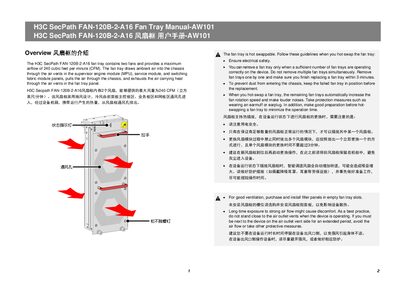
The manual explains how to safely hot‑swap the H3C FAN‑120B‑2‑A16 fan tray, covering electrical safety, replacement time limits, and protective measures such as ear protection. It also describes the fan tray’s airflow design, which draws ambient air through the chassis and exhausts heat.
Installation instructions detail the required tools, orientation of the LED indicator for odd‑ and even‑numbered slots, and step‑by‑step procedures for inserting and removing the tray. Safety precautions include wearing an ESD wrist strap and avoiding contact with rotating fans.
| Number of fans | 2 |
|---|---|
| Fan tray slots in device | 6 (FAN1‑FAN6) |
The LED should be at the bottom for odd‑numbered slots.
Wear an ESD wrist strap and ear protection such as earmuffs or earplugs.