
This user manual covers the functions, features, and operations of a generic mobile phone, including key usage, menu navigation, SOS settings, and…
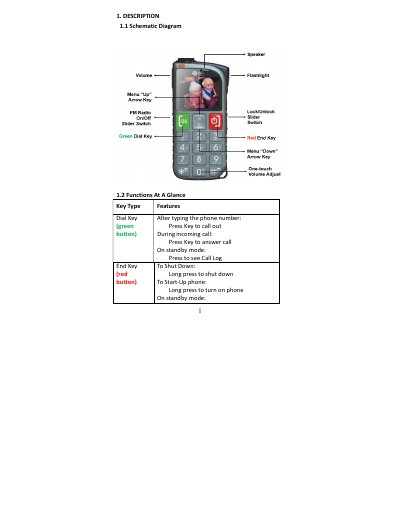
This manual describes the physical layout and basic functions of the mobile phone, including the dial keys, navigation arrows, volume controls, and the orange SOS emergency button. It details how to operate the flashlight, manage screen locks, and adjust volume during calls.
| Language Support | English/Simplified Chinese/Bahasa Melayu |
|---|---|
| SIM Card Support | Dual SIM |
| Emergency Feature | SOS Ring and SOS Message |
Long press the flashlight button located on the right side of the phone for at least 3 seconds to turn it on.
Long press the orange SOS Button at the rear of the phone to emit a loud siren and send SOS messages.
The phone supports English, Simplified Chinese, and Bahasa Melayu for display and writing.
In standby mode, slide the Power Switch 'up' on the right side of the phone to lock it.