
Setup guide for the Foxtel FX06600 modem for Fibre to the Premises broadband, covering box contents, connections, WiFi setup, lights and troubleshooting.
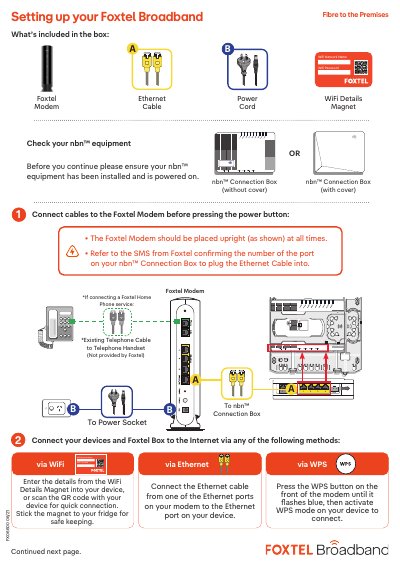
This guide explains how to set up the Foxtel FX06600 modem for a Fibre to the Premises broadband service. It lists the items included in the box, shows how to check the nbn connection box, and describes connecting cables before powering on the modem.
It also covers connecting devices and a Foxtel Box to the Internet by WiFi, WPS or Ethernet, modem light meanings, home phone service notes, and basic troubleshooting steps.
Enter the WiFi network name and password from the WiFi Details Magnet into the device, or scan the QR code; alternatively, press the WPS button on the front of the modem until it flashes blue and activate WPS mode on the device.
Connect the Ethernet cable from one of the Ethernet ports on the modem to the Ethernet port on the device.
Check that all cables are plugged in securely, turn off the modem and nbn equipment, wait 60 seconds, then turn both back on; rebooting may take up to 5 minutes.
Allow up to 15 minutes for the service to begin working, and do not unplug the modem during this time.