
Foxtel Fibre to the Curb Broadband Setup Guide

Step-by-step guide to set up Foxtel broadband fibre to the curb service, including modem connection, Wi-Fi setup, and troubleshooting.
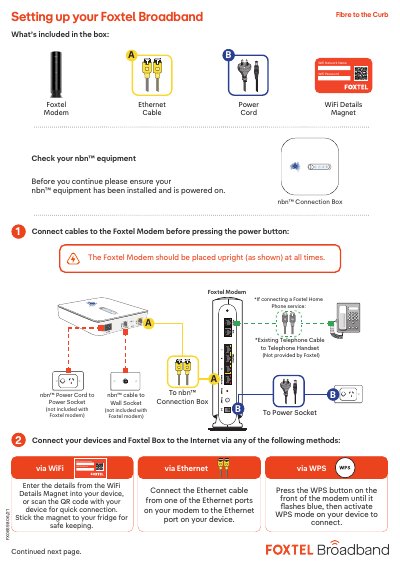

Foxtel Fibre to the Curb Broadband Setup Guide - cover page
Brand
Foxtel
Document type
User Manual
Language
Chinese
Pages
2
File format
PDF
File size
486 KB
Published
07 November, 2026
Updated
07 November, 2026
MD5 checksum
17D55C41504A25A27C9DEB3068037030

About this manual

This guide explains how to connect your Foxtel modem and devices to the nbn™ network. It covers setting up Wi-Fi using a magnet or WPS, connecting via Ethernet, and troubleshooting common issues like internet or phone service problems. The guide also includes information on modem indicator lights and support resources. This manual is written in Chinese.

What's inside

  • What’s included in the box
  • Connecting the Foxtel Modem
  • Connecting devices via Wi-Fi
  • Connecting devices via Ethernet
  • Troubleshooting Internet issues
  • Troubleshooting Home Phone issues
  • Modem light indicators
  • Connecting Foxtel Box to Internet
  • Support resources

Frequently asked questions

What do the modem lights mean?

The light will be solid blue when your modem is connected to the Internet, flashing blue when establishing a connection, and solid red when not connected to the Internet.

How long does it take for the service to begin working?

Allow up to 15 minutes for the service to begin working.

Download PDF (486 KB)