
This Forcepoint X10G quick start guide covers setup for the X10G chassis and blade system, including racking, network connection, and CMC configuration.
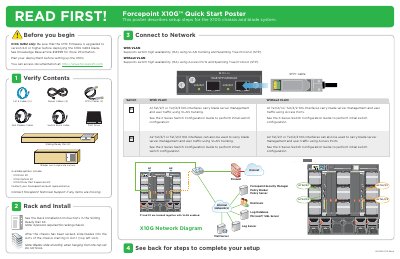
This Forcepoint X10G Quick Start Poster describes setup steps for the X10G chassis and blade system. It lists package contents such as power cables, SFP+ cables, and a DVD drive, and notes that four persons are required for racking the chassis.
The guide covers racking and installing blades, connecting to the network with or without VLAN, setting the CMC IP address using the chassis LCD, powering on the appliance, and accessing firstboot configuration. It also references the X Series Switch Configuration Guide and the Getting Started Guide for further details.
| iDRAC slots | 16 |
|---|---|
| Power supply units | 4 |
| CMC firmware version | 6.0 or higher |
| Database | Microsoft SQL Server 2008/2012 |
Four persons are required for racking the chassis.
Use username root and password Forcepoint#1.
Configure and launch Microsoft SQL Server 2008/2012 off-chassis.
The CMC firmware must be upgraded to version 6.0 or higher before deploying the blade.