
Spanish quick start guide for FingerTec Kadex and m-Kadex access control terminals: date/time, RFID card enrollment, communication settings.
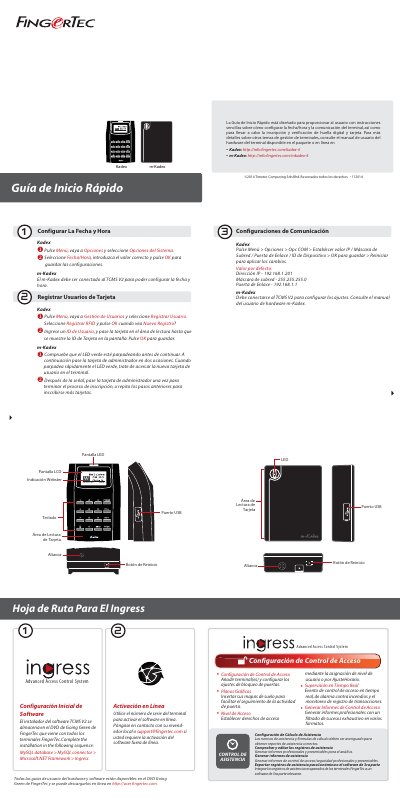
The FingerTec Kadex and m-Kadex Quick Start Guide is a short Spanish-language sheet covering initial setup of the terminals and of the accompanying access control software. It lists software functions such as access control configuration, graphical floor plans, access levels, attendance calculation rules, real-time monitoring, report generation and export of attendance records, and it describes installing TCMS V2 in the order MySQL database > MySQL connector > Microsoft .NET Framework > Ingress, then activating it online with the terminal serial number.
For the hardware, the guide shows the terminal layout (LED and LCD displays, keypad, card reading area, USB port, reset button, speaker) and gives step-by-step instructions for setting the date and time, enrolling RFID card users, and configuring communication settings including IP address, subnet mask, gateway and device ID. It notes that the m-Kadex must be connected to TCMS V2 to be configured, and points to the hardware user manuals available in the package or online. This manual is written in Spanish.
| Default IP address | 192.168.1.201 |
|---|---|
| Default subnet mask | 255.255.255.0 |
| Default gateway | 192.168.1.1 |
| Terminal layout | LED display, LCD display, keypad, card reading area, USB port, reset button, speaker |
Press Menu, go to Options and select System Options, then choose Date/Time, enter the correct value and press OK to save.
No. The m-Kadex must be connected to TCMS V2 in order to configure the date and time and other settings.
Press Menu > Options > COM Option, set the IP address, subnet mask, gateway and device ID, press OK to save and restart to apply the changes.
Use the terminal serial number to activate the software online; contact your local reseller or [email protected] if offline activation is required.