
Extron P/2 DA2 Plus one-input, two-output VGA distribution amplifier user guide: features, installation, DIP switch settings, operation and troubleshooting.
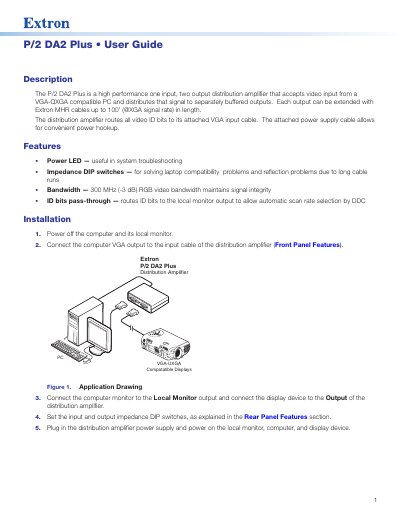
The Extron P/2 DA2 Plus is a one-input, two-output distribution amplifier that accepts video from a VGA-QXGA compatible PC and sends the signal to separately buffered outputs. Each output can be extended with Extron MHR cables up to 100 feet at XGA signal rates, and all video ID bits are routed to the attached VGA input cable. The unit has an attached power supply cable.
This user guide describes the amplifier's features, installation, front and rear panel controls, operation and troubleshooting. Features covered include the power LED, impedance DIP switches for laptop compatibility and long-cable reflection problems, 300 MHz (-3 dB) RGB video bandwidth and ID bits pass-through for automatic scan rate selection by DDC.
| Inputs/Outputs | One input, two separately buffered outputs |
|---|---|
| Video bandwidth | 300 MHz (-3 dB) RGB |
| Computer video compatibility | VGA to QXGA |
| Maximum output cable length | Up to 100 feet with Extron MHR cables at XGA signal rate |
| Power supply | External 12 VDC, 0.5 A; 100 to 240 VAC source |
| Sync input impedance (DIP switch 1) | Down = 510 ohms (default); up = 10k ohms |
| Sync output impedance (DIP switch 2) | Up = 50 ohms (default); down = 75 ohms |
| Input connector | Attached cable with 15-pin HD connector |
| Local Monitor and Output connectors | 15-pin HD female VGA connectors |
It is a one-input, two-output distribution amplifier that takes video from a VGA-QXGA compatible PC and distributes it to separately buffered outputs.
Each output can be extended with Extron MHR cables up to 100 feet at XGA signal rates.
Switch 1 sets sync input impedance (down 510 ohms, up 10k ohms) for laptop instability; switch 2 sets sync output impedance (up 50 ohms, down 75 ohms) when no image reaches the projector. They affect only the Output display, not the Local Monitor display.
Check that the front LED is lit and that the laptop VGA signal is routed to the VGA port, then slide DIP switch 2 to a different position and see if an image appears.