
Installation guide for Extron NetPA Ultra Series audio power amplifiers, covering rack mounting, audio cabling, remote ports, speaker wiring, and Dante…
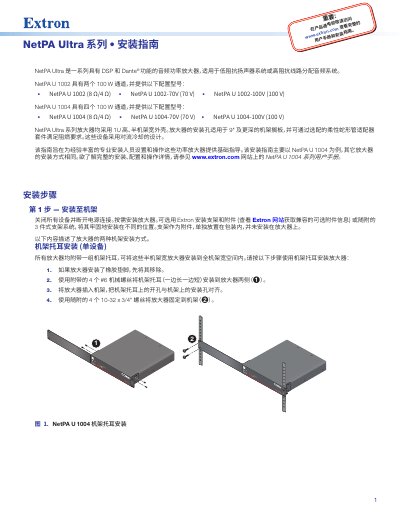
This document provides basic installation instructions for the Extron NetPA Ultra Series audio power amplifiers, which feature DSP and Dante functionality. The guide covers various configuration models for the NetPA U 1002 (2 channels) and NetPA U 1004 (4 channels) series, including 8Ω/4Ω, 70V, and 100V line configurations. It details rack mounting procedures using included ears or bridging plates, audio cable connections, and remote port setup. This manual is written in Chinese.
| Channels | 2 channels (NetPA U 1002) or 4 channels (NetPA U 1004) |
|---|---|
| Power per channel | 100 W |
| Impedance | 8 Ω/4 Ω or 70 V or 100 V |
| Rack height | 1U |
| Cooling method | Convection |
| RS-232 Baud rate | 38,400 |
The maximum stacking height is four units if there is no open rack space between layers.
Connect the Standby pin to the second Ground (G) pin on the remote port.
The front panel LED power indicator turns amber when the amplifier is in standby mode.