
User guide for Extron Control for Microsoft Teams Rooms, covering requirements, installation, configuration, and use of the AV control interface.
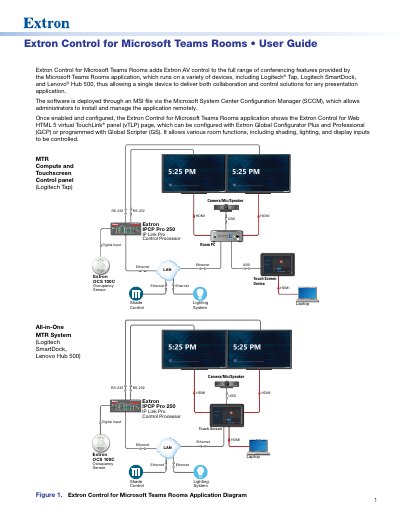
Extron Control for Microsoft Teams Rooms adds Extron AV control to the Microsoft Teams Rooms application on devices such as Logitech Tap, Logitech SmartDock, and Lenovo Hub 500. The software is deployed through an MSI file via Microsoft System Center Configuration Manager (SCCM) and shows an Extron Control for Web HTML 5 virtual TouchLink panel page that can be configured with Global Configurator Plus or programmed with Global Scripter.
The guide covers requirements, GCP configuration, installation on the Microsoft Teams Rooms compute, first-time login and certificate acceptance, default vTLP screens, changing controller credentials, deleting credentials and certificate, and uninstalling the application.
| Supported devices | Logitech Tap, Logitech SmartDock, Lenovo Hub 500 |
|---|---|
| Deployment | MSI file via Microsoft System Center Configuration Manager (SCCM) |
| Control processor | Extron IPCP Pro with User Interface Upgrade LinkLicense |
| GUI Designer version | 1.11.0 or later |
| Global Configurator Plus version | 3.5.1.x or later |
| Global Scripter version | 2.2.0.x or later |
It can run on Microsoft Teams Rooms devices including Logitech Tap, Logitech SmartDock, and Lenovo Hub 500.
It is deployed through an MSI file via Microsoft System Center Configuration Manager (SCCM).
The GUI Designer template provides General, Camera, Display, Lighting, and Shade Controls screens.
The Microsoft Teams Rooms system requires a reboot, after which the Login screen opens and the new credentials must be entered.