
User guide for Exar's SP7656 DC-DC converter evaluation board, covering setup, measurements, voltage adjustment, and component details.
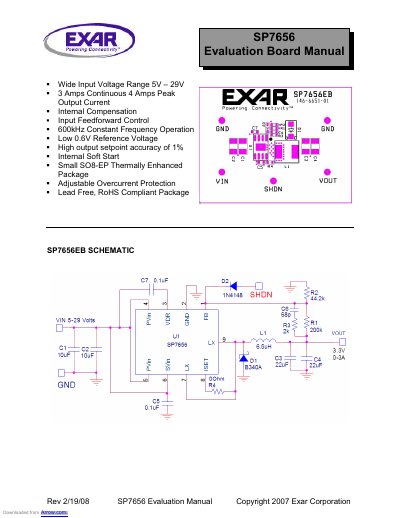
This manual provides instructions for using the SP7656 Evaluation Board, including powering up, measuring output characteristics, and adjusting output voltage via resistor R2. It includes power supply data, efficiency and regulation plots, and component lists. The board supports a wide input voltage range (5V–29V) and delivers up to 4A peak output current. Component placement and ordering information are also provided.
| Input Voltage Range | 5V – 29V |
|---|---|
| Output Current | 3 Amps Continuous, 4 Amps Peak |
| Package Type | SO8-EP Thermally Enhanced |
| Reference Voltage | 0.6V |
| Output Voltage Accuracy | 1% |
| Efficiency | Up to 87% |
| Output Voltage Ripple | Less than 6.6mV at full load |
The board delivers 3 amps continuous and 4 amps peak output current.
Efficiency reaches up to 87% under specified conditions.