
User manual for Exar PCIe-200i and PCIe-200i-SI PCI Express serial I/O cards, covering specs, pin-outs, mode settings, wiring and Windows drivers.
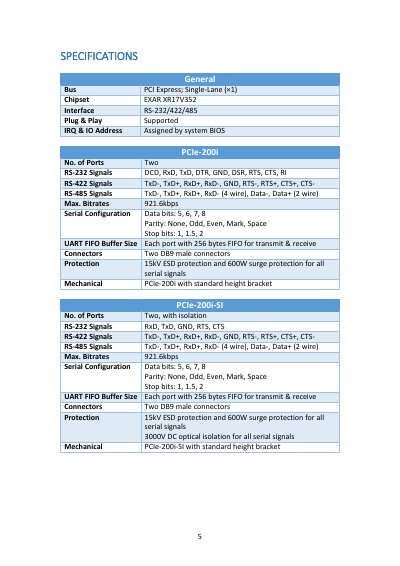
This user manual covers the Exar PCIe-200i and PCIe-200i-SI PCI Express serial I/O cards. Each card has two serial ports and uses the EXAR XR17V352 chipset. The manual lists RS-232, RS-422 and RS-485 signals, DB9 pin-outs, maximum bitrates, FIFO size, protection, isolation for the -SI version, and environmental specifications.
It explains how to select the operating mode with SW1 and SW2 DIP switches, enable termination and biasing resistors with S1 and S2, enable automatic direction control for RS-485 in Windows, and wire RS-422/RS-485 connections. It also gives Windows driver installation and uninstallation steps.
| Bus | PCI Express; Single-Lane (×1) |
|---|---|
| Chipset | EXAR XR17V352 |
| Interface | RS-232/422/485 |
| Number of Ports | Two |
| Max. Bitrates | 921.6kbps |
| UART FIFO Buffer Size | 256 bytes FIFO for transmit & receive |
| Connectors | Two DB9 male connectors |
| Protection | 15kV ESD protection and 600W surge protection for all serial signals |
| Isolation (PCIe-200i-SI) | 3000V DC optical isolation for all serial signals |
| Operating Temperature | 0°C to 60 °C |
| Storage Temperature | -40°C to 85 °C |
| Humidity | 0 to 80% RH, noncondensing |
| Safety Approvals | CE, FCC |
They support RS-232, RS-422 and RS-485.
Each card provides two serial ports.
The maximum bitrate is 921.6kbps.
Open Exar’s Communications Port properties in Device Manager, check “RS-485” and click OK.