
User guide for the Ericsson-LG Enterprise iPECS GDC-800H handset, covering button layout, call management, call forwarding, and speed dial features.
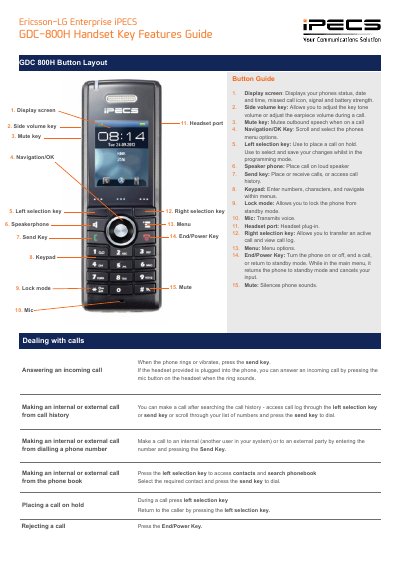
This document provides a guide to the button layout and key features of the Ericsson-LG Enterprise iPECS GDC-800H handset. It details the function of 15 specific keys, including the display screen, volume keys, mute key, navigation/OK key, selection keys, speakerphone, send key, keypad, lock mode, microphone, headset port, menu, and end/power key.
The mute key mutes outbound speech when on a call.
Press the mic button on the headset when the ring sounds.
The End/Power Key turns the phone on or off.
Select the contact, press the right selection key, scroll to speed dial, press select and assign a number.