
Key facts
- Manuals
- 1
- Languages
- EN
- Last added
- 2026-11-01
Featured Ericsson-LG Enterprise manuals
Ericsson-LG Enterprise iPECS 1040i Handset User Guide
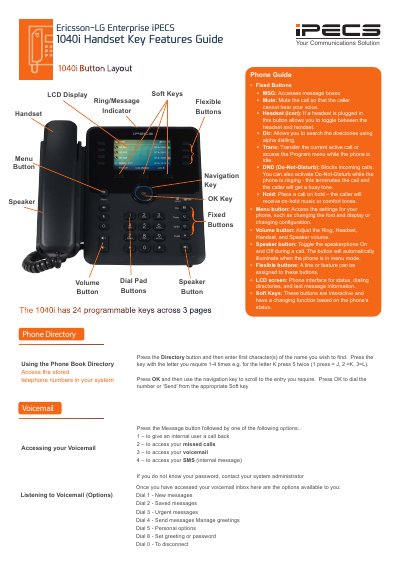
This document serves as a user guide for the Ericsson-LG Enterprise iPECS 1040i handset. It details the functions of fixed buttons, flexible buttons, and the navigation keys, explaining how to use the LCD screen and soft keys for various tasks. The guide provides instructions on accessing the phone book, managing voicemail, and utilizing call features such as Do-Not-Disturb, hold, and transfer.
Covers: Fixed Buttons · Directory Access · Voicemail · Do-Not-Disturb · Call Forwarding · Transferring a Call
Latest Ericsson-LG Enterprise manuals
Ericsson-LG Enterprise iPECS 1040i Handset User Guide
User Manual 2 pages · 246 KB · ENThis user guide covers the operation of the Ericsson-LG Enterprise iPECS 1040i handset, including call handling, directory access, voicemail, and…
Which document do I need?
User Manual
Day-to-day operation, settings and troubleshooting. Start here if the product is already set up.
Questions answered in Ericsson-LG Enterprise manuals
How do I access the phone book directory?
Press the Directory button and then enter the first character(s) of the name you wish to find.
How do I activate Do-Not-Disturb?
Press the DND key to activate it, which blocks incoming calls and terminates ringing calls.