
This user guide covers the operation of the Ericsson-LG Enterprise iPECS 1040i handset, including call handling, directory access, voicemail, and…
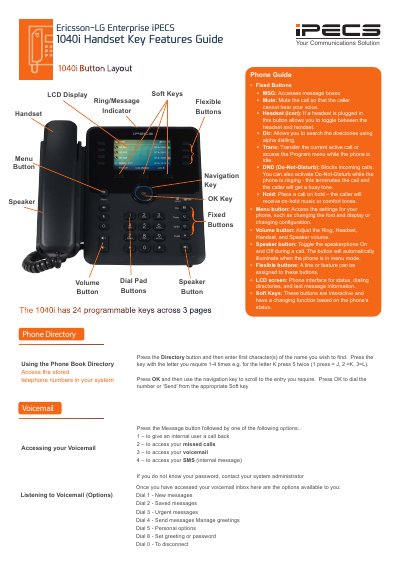
This document serves as a user guide for the Ericsson-LG Enterprise iPECS 1040i handset. It details the functions of fixed buttons, flexible buttons, and the navigation keys, explaining how to use the LCD screen and soft keys for various tasks. The guide provides instructions on accessing the phone book, managing voicemail, and utilizing call features such as Do-Not-Disturb, hold, and transfer.
| Programmable Keys | 24 programmable keys across 3 pages |
|---|
Press the Directory button and then enter the first character(s) of the name you wish to find.
Press the DND key to activate it, which blocks incoming calls and terminates ringing calls.
During an active call, press the Transfer button or the TRANS soft key, then dial the extension or press a programmed flex key.